Mobile apps have become an important aspect of how businesses communicate with their clients, provide services, and foster long-term loyalty. Whether you’re launching an e-commerce app, a healthcare platform, a financial product, or an internal tool for employees, your app is no longer “just an idea”; it’s a living product that must perform consistently in the real world.
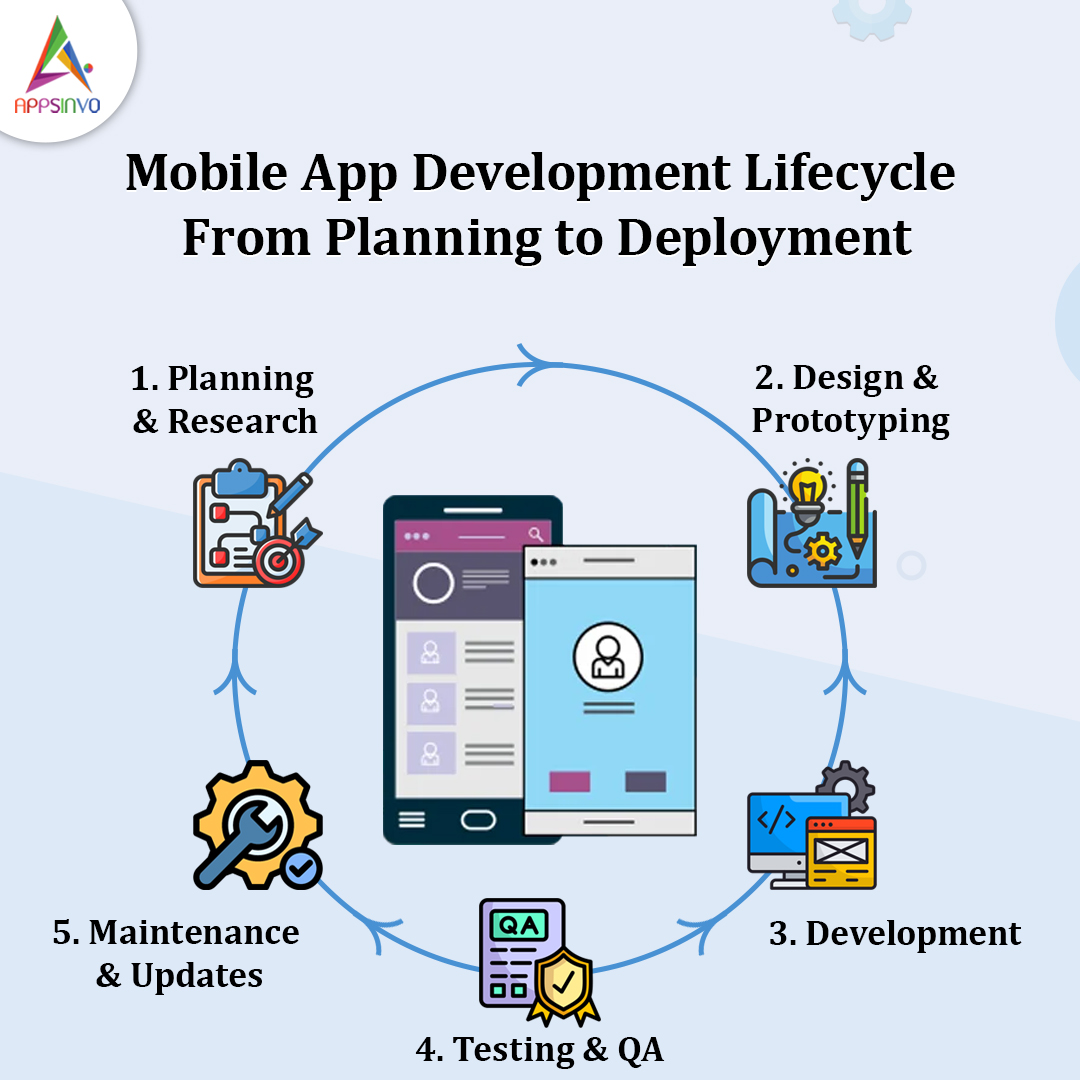
That’s why knowing the mobile app development lifecycle (MDLC) is essential. An organised approach reduces costly mistakes, optimises development costs, improves quality, and manages risks at each stage. Instead of racing from concept to code, you create a plan that ensures your app meets user needs, company goals, and platform requirements.
1) Planning and Idea Validation.
Before you write a single line of code, the most critical task is to plan and validate your idea. This stage establishes the groundwork for everything that follows.
Define the app goals and success metrics.
Start by answering:
- What problem will your application address?
- Who is this for?
- What are the most important results (sign-ups, purchases, bookings, and engagement)?
Tip: Set quantifiable goals early. For example:
- Increase customer retention by 15 percent
- Get 10,000 downloads in three months
- Reduce support tickets by 25%
Identify the target audience.
Your software must be designed for actual people with real requirements. Create user personas like these:
- Busy professionals that desire quick onboarding.
- Families seeking convenience and trust.
- Enterprise teams that require administrative controls and reporting.
Analyse competitors.
Competitor study focuses on learning rather than copying.
- What features work?
- Where do users complain?
- What are the most popular pricing and positioning strategies?
- A thorough market study helps you identify gaps and opportunities.
Consider the following business models:
- Freemium (free core and charged upgrades)
- Subscriptions
- One-time purchases.
- In-app purchases
- B-to-B licensing
- Advertising or affiliate revenue
Practical example:
If your app serves a certain population (for example, home fitness), a subscription model may be more effective than advertising because your customers are already paying for wellness outcomes.
Why Does This Stage Matter?
Planning decreases the likelihood of producing the wrong product. It also increases cost efficiency by avoiding major rework later.
Common Challenges:
- Vague goals that result in confusing criteria
- Developing too many features too early (scope creep)
- Underestimating competition or customer expectations
2) UI/UX Design
Once your app idea has been confirmed, the next step is to turn it into an experience that people will like. This is where UI/UX design is crucial.
Create Wireframes.
Wireframes describe the fundamental structure of each screen:
- Navigation flow
- Screen layout
- Key User Actions
Build prototypes for early feedback.
Prototypes enable stakeholders and users to “test” the flow before full development begins. You can validate:
- Particularly, is onboarding simple?
- Can users finish critical tasks quickly?
- Are the buttons and navigation intuitive?
Design for Usability and Accessibility
Good UI/UX increases engagement and retention by decreasing friction. Users stay when:
- The application feels speedy
- Information is easily found
- Actions are obvious and consistent
Practical example:
A banking app with streamlined balance display, rapid transfer actions, and clear security messaging would most certainly see higher retention than an app with complicated options.
Why Does This Stage Matter?
Design flaws are costly to remedy after development. A good UI/UX strategy boosts conversion rates, lowers churn, and increases brand trust.
Common Challenges:
- Going directly to aesthetics without first doing user research
- Designing without addressing diverse user types or accessibility needs
- Not planned for scalability (adding things later becomes more difficult)
3) App Development (Frontend/Backend)
Now it’s time to create the product. During development, you’ll usually work on two things:
Front End Development (Client Side)
- Users interact with the frontend, which
- Interfaces screens and navigation
- Forms and Buttons
App logic for user flows.
Common front-end approaches include:
- Native development (iOS and Android separately)
- Cross-platform frameworks (e.g., React Native and Flutter)
- Hybrid frameworks (web-based UI within an application)
Backend Development (server-side)
Behind the scenes, the backend is what powers the app.
User authentication and authorisation
Databases and API
Payment processing, notification, and analytics
Business logic and integration
Backend often includes:
API Development (REST/GraphQL)
Cloud infrastructure
Database management
Safe handling of sensitive data
Agile Methodologies and Iteration
Most teams use Agile practices such as:
- Sprint planning
- Iterative releases
- Continuous improvement based on feedback
This allows for more flexibility in development and ensures that you produce what people require rather than what was originally anticipated.
Practical example:
During early sprints, you can release an MVP that includes fundamental functionality (such as sign-up, profile, and one primary feature). Then iterate depending on usage data.
Common Challenges:
- Poor API design slows down feature delivery
- Inconsistent requirements among teams
- Not preparing for performance from day one
- Underestimating the security and compliance needs.
This keeps development flexible and helps ensure you build what users need—not just what was originally planned.
4) Testing/ Quality Assurance (QA)
It is testing that your app receives credibility. It should not just be a smooth demo, but actual users will discover edge cases, slow networks, and other unforeseen behaviour.
Types of Testing That You should take into consideration.
1. Functional Testing
Ensures features behave as desired (e.g. login, payments, search, uploads).
2. Performance Testing
Measures speed, responsiveness, and load handling (critical to scale-up apps).
3. Security Testing
Checks vulnerabilities such as poor data storage, poor authentication and API risks.
4. Compatibility Testing
Testing in various devices, screen sizes, OS version and network conditions.
5. Usability Testing
Ensures that users navigate around the site and perform tasks visibly.
The Essence of Testing before Launch.
- Bad reviews are avoided because of crashes or failed workflow.
- Post-release support costs are reduced.
- Enhances customer satisfaction by being reliable.
Common challenges:
- Rushing in the test to fulfill the deadlines.
- Poor test coverage of important user flows.
- Leaving the security considerations late (which may bring significant delays)
5) Deployment & Launch
Once the app is ready and tested, it moves to deployment—where platform rules matter.
Prepare for App Store Submission
You’ll need:
- App listing metadata (title, description, keywords)
- Screenshots and visuals
- App icon and branding assets
- Privacy policy and data handling details
- Test builds and compliance checks
Launch on Google Play & Apple App Store
Each platform has its own submission process and guidelines:
- Apple App Store is known for detailed review and compliance requirements.
- Google Play has its own policies and review timelines.
Practical example:
If your app uses user location, analytics, payments, or messaging, you must provide accurate disclosures and permissions to avoid rejection.
App Store Optimization (ASO)
To improve visibility:
- Use relevant keywords in the description
- Write a compelling value proposition
- Keep visuals high quality
- Encourage early downloads and ratings
Common challenges:
- Rejection due to policy violations or missing disclosures
- Delays caused by incomplete metadata or unstable builds
- Underperforming launch because ASO was overlooked
6) Maintenance & Updates
- Bug fixes and stability bugs.
- Performance (crashes, load time, user drop-offs)
- Dependency updates and security patches.
- Improvements of features on a user feedback basis.
- Frequent Updates in order to remain competitive.
- Seasonal improvements (where retail or event-based apps are used)
- No clear update roadmap
- Ignoring the users until problems swell.
- Failure to monitor performance and crash reports.
How Appsinvo Can Help at All Stages
- Secure and scalable infrastructures
- User-centred UI/UX design.
- Agile development enables rapid iteration.
- QA processes that enhance reliability
- Post-launch help to keep your app evolving
5) How frequently should applications be updated?
Many apps benefit from regular updates (often monthly or as needed), as well as larger feature releases based on your product roadmap and user feedback.
6) What is the greatest risk in the lifecycle?
The most prevalent hazards are unclear requirements, scope creep, ignoring user validation, and launching without rigorous testing and compliance checks.