


In the year 2019, Facebook-owned WhatsApp has introduced many features like audio playback, group privacy, self-destructing messages, fingerprint lock, WhatsApp pay, dark mode, and Netflix streaming.
This time Whatsapp has begun the rollout of call waiting feature for android users.
According to the name, this call waiting feature alerts users when they receive a Whatsapp call from other people in the middle of already ongoing Whatsapp call.
Prior to the update, Whatsapp call from other people automatically gets disconnected but after the call waiting feature, users will get an alert.
Users also can choose whether to accept the incoming call and declined the ongoing call or declined the new waiting call.
Here is the point to note that this is not the same as putting a call on hold since two users can’t be on the same line concurrently.
This call waiting feature is for both the Android and iOS users after being made avail for the iPhone app last month.
The latest Whatsapp brings the call waiting feature update for both the beta as well as for the stable android channels.
It is confirmed that the Whatsapp call waiting feature is now available in version 2.19.352 of the stable Android app, version 2.19.357 and version 2.19.358 of the beta app.
WhatsApp v2.19.120 for iOS brought the call waiting feature alongside a redesigned Chat screen.
As well as the ability to quickly send your messages directly from the Braille keyboard while using VoiceOver mode.
How Whatsapp Call Waiting Feature Works
Unlike call holding on a regular call over a cellular network, WhatsApp won’t allow you to put the second incoming call on hold and link with two people on the line simultaneously.
You either choose to continue with the ongoing WhatsApp call or disconnect it in order to accept the second incoming call.
The incoming call UI in WhatsApp now shows a green ‘End & Accept’ button alongside the ‘Decline’ button.
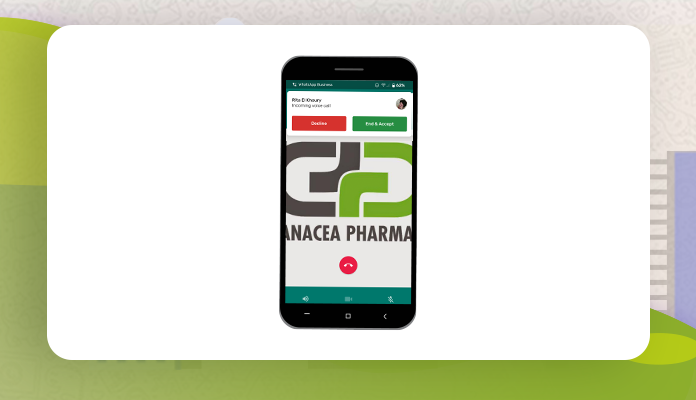
If you press the red ‘Decline’ button, the incoming call will be canceled and you can carry on with your ongoing call.
However, if you tap on the ‘End & Accept’ button, the ongoing call will be disconnected so that you can talk to the other person.
The new call waiting feature is already rolled out for the users and if you are unable to access this feature update your Whatsapp and enjoy the new feature.
Follow and Connect with us on
Facebook | Instagram | Linkedin | Twitter | Tumblr | Pinterest










amazing
Hey there! This post could not be written any better! Reading through this post reminds me of my good old room mate! He always kept chatting about this. I will forward this post to him. Pretty sure he will have a good read. Thank you for sharing!|
Hey just wanted to give you a brief heads up and let you know a few of the pictures aren’t loading correctly. I’m not sure why but I think its a linking issue. I’ve tried it in two different web browsers and both show the same outcome.|
Hello, Neat post. There is a problem together with your site in internet explorer, might check this? IE still is the marketplace chief and a big portion of people will miss your wonderful writing due to this problem.|